
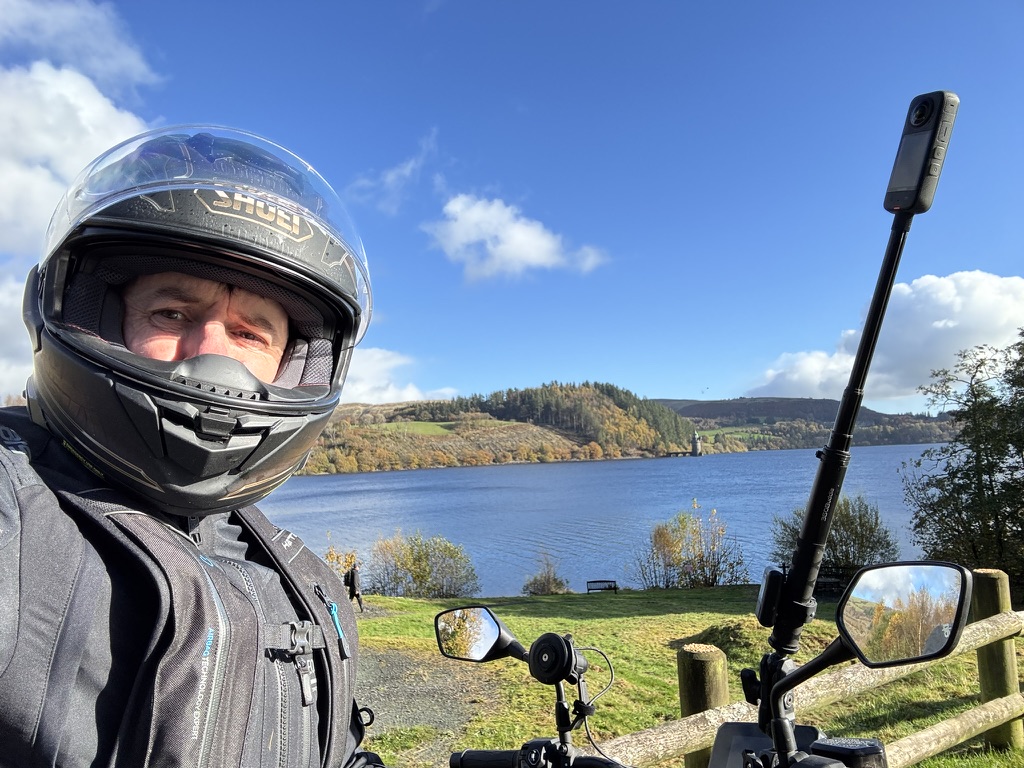
TL;DR: I took the brand new Qwen 3.5 397B multimodal model for a spin on my Mac Studio (M3 Ultra, 512GB RAM). I quantized it down to 2-bit, 3-bit, 6-bit, and 8-bit to test vision capabilities for a local video editing workflow. Spoiler: Q2 is gibberish, Q3 is surprisingly capable, and Q6 is the Goldilocks zone. Bigger isn’t always better when speed is the game.
Here I am typing at 11:07 PM after being teleported from 5:10 PM when I naively said, “I’ll give this new model a quick spin.” LOL.
The model in question is the absolute unit that is Qwen 3.5 Vision (397B), released only yesterday. I’m running it on a Mac Studio M3 Ultra with 512GB of RAM. Lucky me, I know—and that’s exactly why I’m sharing these findings tonight. If you aren’t fortunate enough to have half a terabyte of unified memory sitting on your desk, hopefully, this saves you the download time and gives you some awareness of what’s possible.
I’m currently evaluating a slightly more secure OpenClaw deployment (huge congratulations to @steipete on his next journey into OpenAI—you Legend! I don’t think Sam will be able to tame you. Thank you!!) by using it with local models only. I’m deep in performance tuning mode. If anyone remembers the “good old days” of trying to hunt down Linux drivers for a SoundBlaster card, well, I’m happy to report we’ve gone full circle in the AI world. The MoE model used wasn’t in the Python library built into LM Studio (surprise, surprise), so it was time to spin up a new virtual environment and start pip-ing.
The irony isn’t lost on me that while we have these bleeding-edge tools, the likes of Gemini and ChatGPT often can’t help debug them because they simply don’t know they exist yet. Long live Github Issues.
The Mission: Local Automated Video Editing
The point of tonight’s endeavor wasn’t just to flex hardware. I’m building out an automated video editing tool. I have hundreds of hours of footage and a crappy broadband upload link, so cloud processing is out. Processing locally is key.
My goal is to determine if I can get away with a heavily quantized (smaller) model. A smaller model means faster inference and a larger context window, which is crucial since I plan to run several models concurrently for other tasks. I need this machine to be self-funding once I unleash it!
The Experiment: Qwen 3.5 Quantization Showdown
I ran a reference image (a selfie of yours truly in motorcycle gear above) through Quant 2 (Q2), Quant 3 (Q3), Quant 6 (Q6), and Quant 8 (Q8) versions of the new Qwen 3.5 vision model. Here is the visual breakdown of the results.
The Test Command
For each test, I used the following curl command against my local MLX server:
curl http://localhost:1234/v1/chat/completions \
  -H "Content-Type: application/json" \
  -d '{
    "model": "/Users/graz/ai-models/Qwen3.5-397B-MLX-QX",
    "messages": [
      {
        "role": "user",
        "content": [
          { "type": "text", "text": "Describe this image in detail." },
          { "type": "image_url", "image_url": { "url": "data:image/jpeg;base64,'$IMAGE_B64'" } }
        ]
      }
    ],
    "max_tokens": 300
  }' | python3 -m json.tool
1. The Q2 Experience: Total Collapse
Verdict: Useless.
At 2-bit quantization, the model completely fell apart. It hallucinated absolute gibberish.
{
    "choices": [
        {
            "message": {
                "content": ")nameUnc\u0901Op\u90f4\u5ddeG forOP MG, #clar sp  sp \\ sp spNgG Sign       h ${Ag1X/work ${))\r\n\r\n{$ \\\"Se\u00bb^#\\\",81 signifLaMd_M_Y_Y_\\up'\\ \\a)\\\\ra%d\\n#\\cd\\u#\\xe8\\f#888888 :)\" \\VAR{\\O\u2713\ufffd\ufffd}",
                "role": "assistant"
            }
        }
    ],
    "usage": {
        "total_tokens": 243
    }
}
2. The Q3 Experience: The Surprise Contender
Verdict: The “Rough Draft” Hero.
I expected this to be barely readable, but it actually captured the essence of the image perfectly. It missed some finer textures, but for a first-pass filter? This is viable.
{
    "choices": [
        {
            "message": {
                "content": "The user wants a detailed description of the image.\n\n1.  **Identify the main subject:** A man wearing a motorcycle helmet and jacket. He is positioned on the left side of the frame.\n2.  **Identify the background:** A scenic landscape featuring a large body of water (lake), rolling hills with trees showing autumn colors, and a blue sky with scattered clouds.\n3.  **Identify specific details:**\n    * **Helmet:** Silver/grey, full-face, with \"SHOEI\" branding visible. The visor is up.\n    * **Clothing:** A dark grey or black motorcycle jacket with zippers and pockets.\n    * **Motorcycle parts:** Handlebars, rear-view mirrors, and a phone mount with a phone attached are visible in the foreground and right side.\n    * **Setting:** Looks like a scenic overlook or a stop during a ride. There's a wooden fence in the lower right.\n    * **Lighting:** Bright, sunny day. Shadows are distinct.",
                "role": "assistant"
            }
        }
    ]
}
3. The Q6 Experience: The Goldilocks Zone
Verdict: Perfect Balance.
This is where the magic happens. The description is rich, accurate, and fluid. It picked up on the “slight smile” inside the helmet and the specific reflection in the mirror.
{
    "choices": [
        {
            "message": {
                "content": "The user wants a detailed description of the provided image.\n\n1.  **Identify the main subject:** A person wearing a motorcycle helmet and jacket. They are in the foreground on the left.\n2.  **Analyze the subject's details:**\n    * **Helmet:** Full-face, black/dark grey, \"SHOEI\" logo visible on the forehead area. The visor is clear and raised slightly or just transparent enough to see the face. The person inside looks like a middle-aged man with light skin.\n    * **Jacket:** Black motorcycle textile jacket. Zippers and padding are visible.\n    * **Expression:** Slight smile, looking towards the camera (selfie style).\n\n3.  **Identify the secondary subject/foreground objects:**\n    * **Motorcycle parts:** Handlebars, side mirrors (one on the left, one on the right), and a phone mount on a tall stalk extending upwards on the right.",
                "role": "assistant"
            }
        }
    ]
}
4. The Q8 Experience: Diminishing Returns?
Verdict: High Definition, but Heavy.
The Q8 model adds slightly more nuance to the lighting and colors (“autumn vibes”), but at the cost of significantly higher memory usage. For my video pipeline, Q6 is likely sufficient.
{
    "choices": [
        {
            "message": {
                "content": "The user wants a detailed description of the image.\n\n1.  **Identify the main subject:** A person wearing a motorcycle helmet and gear, taking a selfie.\n2.  **Analyze the foreground:**\n    * **Person:** Wearing a dark grey/black full-face helmet with \"SHOEI\" branding. Only their eyes and part of their nose/forehead are visible through the visor.\n    * **Motorcycle parts:** Visible handlebars, side mirrors (one reflecting the sky/trees), and a phone mount on a tall stalk extending upwards on the right side. The phone is mounted vertically.\n    * **Background:** ... The trees show autumn colors (yellows, browns, greens), suggesting the season is autumn.",
                "role": "assistant"
            }
        }
    ]
}
How to Replicate This (The “Geek” Guide)
For those of you with the hardware to run this, here is the exact recipe I used to get these up and running locally on Apple Silicon.
1. Quantization
I converted the original Hugging Face weights using mlx_vlm. Note the use of the 2-bit flag here (which I later deleted because, well, see above).
python -m mlx_vlm.convert \
  --hf-path ~/ai-models/Qwen3.5-Original \
  --mlx-path ~/ai-models/Qwen3.5-397B-MLX-Q2 \
  -q --q-bits 2
2. Launching the Server
Once converted, I launched the server using mlx-openai-server. Expect some AVFFrameReceiver warnings if you have OpenCV installed—you can ignore them.
mlx-openai-server launch \
  --model-path ~/ai-models/Qwen3.5-397B-MLX-Q3 \
  --model-type multimodal \
  --port 1234
3. The Storage Reality Check
Before you start downloading, check your disk space. Here is the footprint of the different quantization levels on my drive:
(base) graz@GeekwiththePeak 🤓 ~/ai-models $ for i in `ls ~/ai-models | grep Qwen3.5-397B-MLX-Q`; do du -sh $i; done
162G    Qwen3.5-397B-MLX-Q3
301G    Qwen3.5-397B-MLX-Q6
393G    Qwen3.5-397B-MLX-Q8
Conclusion
This experiment proved that bigger is NOT always better. If you are building a pipeline where speed is critical, the Q3 model (at 162GB) is surprisingly competent at “seeing” the scene, identifying objects, and understanding context. It’s a fantastic first-pass filter.
For the final polish or high-detail analysis, Q6 is the winner. It provides 99% of the detail of Q8 but saves nearly 100GB of RAM/Disk space.
I’m off to get some sleep. Tomorrow, the automation begins.
 Cumulus Chatter with a Sprinkle of AI
Leave a comment