
Compliance isn’t just about ticking boxes—it’s about creating a structured approach to managing risks. For organisations operating under NIS 2 and DORA, compliance frameworks ensure resilience, transparency, and accountability. Effective assurance policies form the backbone of this effort, setting clear guidelines for what is acceptable in your software delivery pipeline.
Why Assurance Policies Are Essential
Without clear policies, teams may struggle to prioritise vulnerabilities, leading to inefficiencies and increased risk exposure. Assurance policies serve as guardrails, aligning team efforts with organisational goals. For instance, a policy focusing on critical vulnerabilities ensures that resources are allocated where they’re needed most.
How to Build and Implement Assurance Policies with Aqua CNAPP
-
Collaborate Across Teams:
- Work closely with compliance officers, AppSec teams, and leadership to define organisational priorities. Aqua’s prebuilt policy templates provide a starting point for discussions.
-
Define Critical Controls:
- Begin with high-impact areas such as:
- Vulnerability Severity: Focus on critical and high-severity issues.
- Misconfigurations: Target infrastructure-as-code (IaC) and container settings.
- Sensitive Data: Detect and prevent the leakage of credentials and secrets.
- Begin with high-impact areas such as:
-
Leverage Aqua’s Policy Framework:
- Aqua’s assurance policies can be configured to enforce standards across:
- Source Code: Use Static Application Security Testing (SAST) to catch issues early.
- Containers: Enable malware scanning and privilege escalation controls.
- Cloud Configurations: Align with CIS benchmarks for cloud security.
- Aqua’s assurance policies can be configured to enforce standards across:
-
Iterative Rollout:
- Start in audit-only mode to evaluate the impact of policies without disrupting workflows. Gradually transition to enforce mode as teams become familiar with expectations.
Practical Policy Example: Container Assurance Policy
Aqua provides default container policies that can be customised to your needs. For example:
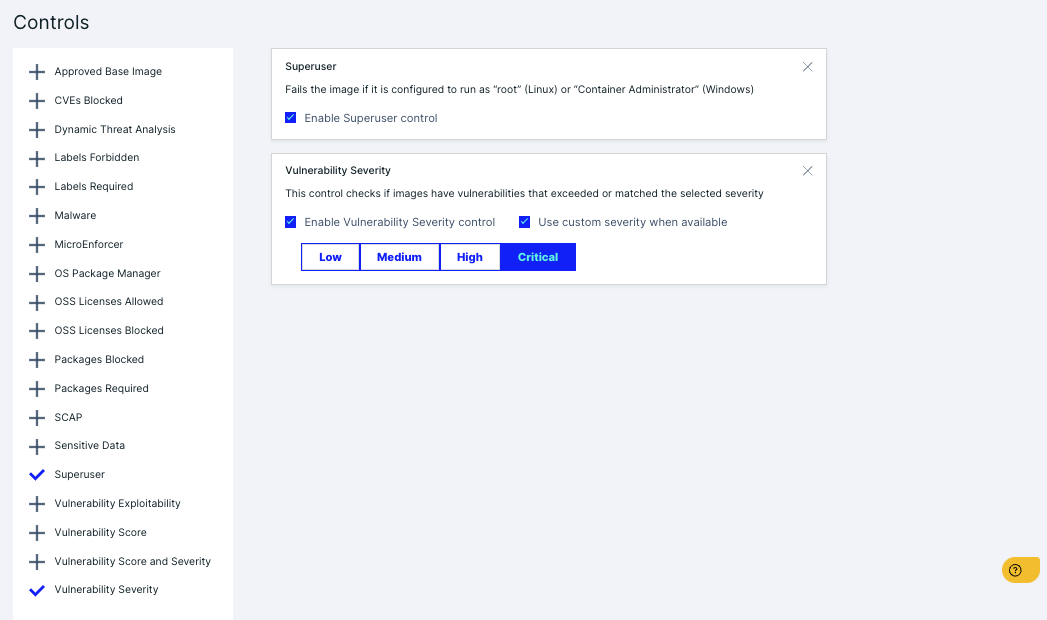
- Policy Name: “Critical Vulnerability Blocker”
- Scope: All container images.
- Controls:
- Block images with vulnerabilities rated critical.
- Prevent execution of containers with escalated privileges.
Summary
Assurance policies are the foundation of secure and compliant pipelines. By leveraging Aqua’s tools, you can establish clear, enforceable standards that align with NIS 2 and DORA directives. These policies not only protect your organisation but also demonstrate a commitment to proactive risk management.
 Cumulus Chatter with a Sprinkle of AI
Leave a comment