
Cybersecurity has long been reactive, often addressing vulnerabilities after deployment. But in the era of cloud-native applications, this approach is no longer sufficient. Shifting security left—embedding it into the earliest stages of development—enables organisations to identify and mitigate risks before they impact production.
The software supply chain, which includes source code, build systems, and container images, is a primary target for attackers. By integrating scanning tools directly into development workflows, organisations can meet NIS 2 and DORA requirements for proactive risk management and secure software delivery pipelines.
Why Shifting Left Matters
The earlier a vulnerability is detected, the less costly and time-consuming it is to fix. Shifting security left aligns perfectly with DORA, which emphasizes resilience and proactive measures. For example, source code scanning during development can catch issues before they propagate downstream, reducing risks and maintaining operational continuity.
How to Shift Left with Aqua CNAPP
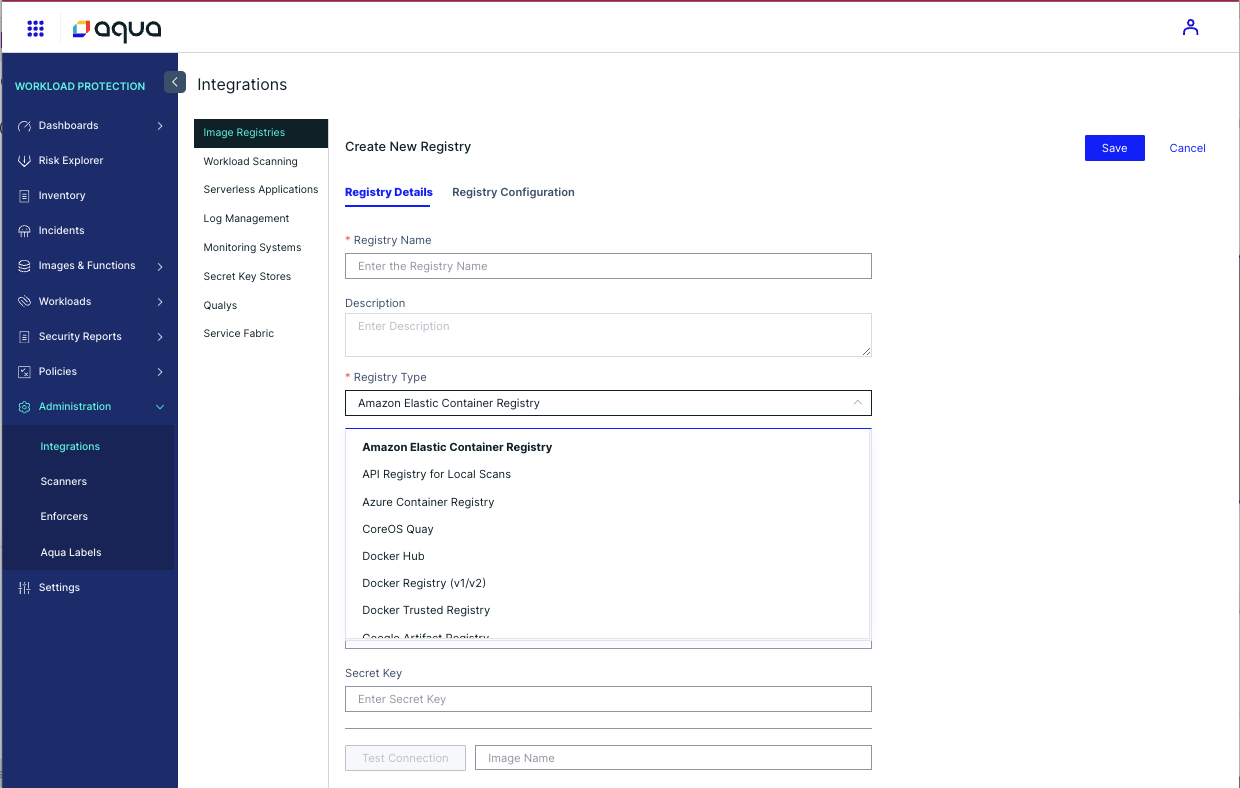
- Bulk Scanning of Registries:
- Connect Aqua to all source code repositories and container registries.
- Set up scheduled scans to ensure every new artifact is analysed for vulnerabilities, misconfigurations, and secrets.

-
Continuous Monitoring:
- Leverage Aqua’s automated pull schedules to keep scans up-to-date as new code is committed or images are pushed to the registry.
-
Developer Enablement:
- Integrate scanning results directly into developers’ workflows using CI/CD tools. Aqua’s feedback mechanisms provide actionable insights, enabling developers to fix issues quickly without leaving their environments.
-
Establish Baselines:
- Use initial scan results to create a baseline of vulnerabilities and misconfigurations. Prioritise fixes for critical issues while monitoring progress over time.
Practical Example: Automating Scans in CI/CD Pipelines
A typical Aqua configuration in a CI/CD pipeline, using Github Actions in this instance, might look like this:
name: allthingsclowd APP
on:
  push:
    branches:
      - main
  pull_request:
    branches:
      - main

  workflow_dispatch:

env:
   DOCKER_REPOSITORY: allthingscloud # name of Docker Hub ID
   IMAGE_NAME: allthingsclowd-app
   IMAGE_TAG: ${{ github.run_number }} # $GITHUB_RUN_NUMBER

jobs:
  CI-Code:
    runs-on: ubuntu-22.04
    steps:

      - name: Checkout code
        uses: actions/checkout@v2

      - name: Integrity pipeline
        uses: aquasecurity/pipeline-enforcer-action@main
        with:
          aqua-key: ${{ secrets.AQUA_KEY }}
          aqua-secret: ${{ secrets.AQUA_SECRET }}
          verbose: true

      - name: Aqua code scanning(SCA,IaC, Secrets/Sensitive Data, Pipeline file and SAST)
        uses: docker://aquasec/aqua-scanner
        with:
          args: trivy fs --scanners config,vuln,secret --sast --reachability --package-json .
          # To customize which severities to scan for, add the following flag: --severity UNKNOWN,LOW,MEDIUM,HIGH,CRITICAL
          # To enable SAST scanning, add: --sast
          # To enable npm/dotnet non-lock file scanning, add: --package-json / --dotnet-proj
        env:
          AQUA_KEY: ${{ secrets.AQUA_KEY }}
          AQUA_SECRET: ${{ secrets.AQUA_SECRET }}
          GITHUB_TOKEN: ${{ github.token }}
          TRIVY_RUN_AS_PLUGIN: 'aqua'

  CI-Build:
    needs: CI-Code
    runs-on: ubuntu-22.04

    steps:

      - name: Checkout code
        uses: actions/checkout@v2

      - name: Integrity pipeline
        uses: aquasecurity/pipeline-enforcer-action@main
        with:
          aqua-key: ${{ secrets.AQUA_KEY }}
          aqua-secret: ${{ secrets.AQUA_SECRET }}
          verbose: true

      - name: Build application
        run: echo Application has been succesfully built

      - name: Build image container
        run: |
          sudo docker build -t $DOCKER_REPOSITORY/$IMAGE_NAME:$IMAGE_TAG .

      - name: Login to Aqua Registry
        uses: docker/login-action@v1
        with:
          registry: registry.aquasec.com
          username: ${{ secrets.AQUA_REGISTRY_USERNAME }}
          password: ${{ secrets.AQUA_REGISTRY_PASS }}

      - name: Scanning container image
        run: |
          docker run --rm -v /var/run/docker.sock:/var/run/docker.sock registry.aquasec.com/scanner:2022.4 scan --register --registry "CI/CD_graham_images" --host ${{ secrets.AQUA_HOST }} --local $DOCKER_REPOSITORY/$IMAGE_NAME:$IMAGE_TAG --token ${{ secrets.AQUA_TOKEN }} --layer-vulnerabilities --no-verify --html > .github/workflows/scan-output.html

      - name: Docker Login & Push
        run: |
          echo "${{ secrets.DOCKERHUB_PASSWORD }}" | docker login -u ${{ secrets.DOCKERHUB_USERNAME }} --password-stdin
          docker push $DOCKER_REPOSITORY/$IMAGE_NAME:$IMAGE_TAG
          docker tag $DOCKER_REPOSITORY/$IMAGE_NAME:$IMAGE_TAG $DOCKER_REPOSITORY/$IMAGE_NAME:latest
          docker push $DOCKER_REPOSITORY/$IMAGE_NAME:latest

      - name: SBOM Generation
        run: |
          export BILLY_SERVER=https://billy.codesec.aquasec.com
          curl -sLo install.sh download.codesec.aquasec.com/billy/install.sh
          curl -sLo install.sh.checksum https://github.com/argonsecurity/releases/releases/latest/download/install.sh.checksum
          if ! cat install.sh.checksum | sha256sum ; then
          echo "install.sh checksum failed"
          exit 1
          fi
          BINDIR="." sh install.sh
          rm install.sh install.sh.checksum
          ./billy generate \
            --access-token "${{ github.token }}" \
            --aqua-key "${{ secrets.AQUA_KEY }}" \
            --aqua-secret "${{ secrets.AQUA_SECRET }}" \
            --artifact-path "$DOCKER_REPOSITORY/$IMAGE_NAME:$IMAGE_TAG"

  CD-Deploy_to_dev:

    needs: CI-Build
    runs-on: ubuntu-22.04

    steps:

      - name: Checkout code
        uses: actions/checkout@v2

      - name: interity Pipeline
        uses: aquasecurity/pipeline-enforcer-action@main
        with:
          aqua-key: ${{ secrets.AQUA_KEY }}
          aqua-secret: ${{ secrets.AQUA_SECRET }}
          verbose: true

      - name: Setting K8s context
        uses: azure/k8s-set-context@v3
        with:
           method: kubeconfig
           kubeconfig: ${{ secrets.KUBE_CONFIG_GRAZ }}
           context: graz-dev-context


      - name: Deploying to Dev
        run: |
          export IMAGE_CONTAINER="docker.io/$DOCKER_REPOSITORY/$IMAGE_NAME:$IMAGE_TAG"
          sed -e "s#{{ IMAGE_CONTAINER }}#$IMAGE_CONTAINER#g" "./manifests/dev/deployment.yaml" |
          kubectl apply -f -
          kubectl apply -f ./manifests/dev/service.yaml
This automation ensures that every build is scanned for high-severity vulnerabilities, providing immediate feedback to developers.
Summary
Shifting security left transforms the software supply chain from a vulnerability hotspot into a fortress of resilience. By embedding Aqua’s scanning tools into your workflows, you not only improve security but also align with DORA’s proactive approach to operational resilience. The earlier you act, the stronger your defences.
 Cumulus Chatter with a Sprinkle of AI
Leave a comment